Here are the game engines based on javascript
1)phaser.js
2)babylon.js
we can create a standard 3d games using this ‘babylon.js’
3)play canvas webgl game engine

Here are the game engines based on javascript
1)phaser.js
2)babylon.js
we can create a standard 3d games using this ‘babylon.js’
3)play canvas webgl game engine
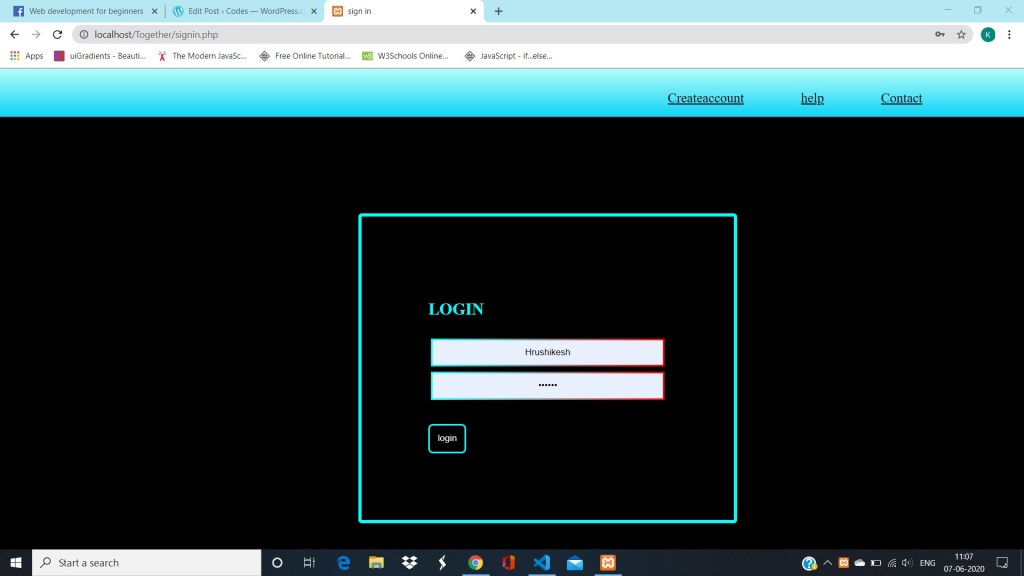
This the html code …..
<div class = “l_list”> <ul> <li><a href=”signup.php”>Createaccount</a></li> <li><a href=”#”>help</a> </li> <li><a href=”#”>Contact</a></li> </ul> </div>
add this css to look like this
.l_list { margin: 0; padding: 0; background-image: -webkit-linear-gradient(#B2FEFA, #0ED2F7); position: absolute; top: 0%; height: 10%; width: 100%; } .l_list ul { position: absolute; left: 60%; top: 1%; } .l_list ul li { list-style: none; display: inline-block; padding: 5px; margin: 5px; left: 50%; } .l_list ul li a { margin: 10px; color: black; width: 60px; padding: 20px; font-size: 20px; } .l_list ul li a:hover { background-color: black; color: #00FFFF; }
and the reasult is…..
Thanks for visiting !!!!
Code for The page
<html>
<head></head>
<body>
Facebook
<link type=”stylesheet” href=”style.css”>
<div class=”header”>
<img src=”/storage/emulated/0/Download/logo.png” height=”60px” width=”120px”>
<form>
<label class=”h”>emailid/phone no.</label>
<input type=”text” placeholder=”username”>
<label class=”r”>password</label>
<input type=”password” placeholder=”password”>
<label><br> <label class=”u”>terms and conditions applied </label> <input type=”checkbox”> <a href=”#”>forgotten password?</a> </label>
</form>
</div>
<div class=”leftside”>
<img src=”/storage/emulated/0/Download/Img.jpeg”>
</div>
<div class=”rightside”>
<h1>Create an account</h1>
<h3>It’s free and always will be</h3>
<form class=”form2″>
<input class=”firstname” type=”text” placeholder=”first name”>
<input class=”lastname” type=”text” placeholder=”last name”>
<br>
<input class=”email” type=”text” placeholder=”email”>
<br>
<input class=”email” type=”text” placeholder=”re-enter email”>
<br>
<input class=”password” type=”password” placeholder=”password”>
<br>
<input type=”date” placeholder=”date of birth”>
<br>
<input type=”radio” name=”gender” value=”male”>
<label for=”male”>male</label>
<input type=”radio” name=”gender” value=”female”>
<label for=”female”>female</label>
<br>
<label class=”k”>By clicking Create an account, you agree to our Terms and that you have read our Data Policy, including our Cookie use.</label>
<input type=”submit” value=”create account”>
</form>
</div>
</body>
</html>
body {
background-color: #D4D8E8;
}
.header{
background-color: #3b5998;
}
.header input[type=”text”]{
position: absolute;
left: 60%;
top: 4%;
}
.header input[type=”password”]{
position: absolute;
left: 80%;
top: 4%;
}
.header input[type=”checkbox”]{
position: absolute;
left: 60%;
top: 6%;
}
.h{
position: absolute;
left: 60%;
top: 2%;
color: white;
}
.r{
position: absolute;
left: 80%;
top: 2%;
color: white;
}
.u{
position: absolute;
left: 63%;
top: 6%;
color: white;
font-size: 9px;
}
.header a{
position: absolute;
left: 80%;
top: 6%;
color: white;
}
.leftside img{
position: absolute;
top: 7.5%;
height: 30%;
width: 59%;
}
.rightside{
position: absolute;
left: 60%;
top: 8%;
}
.email{
padding: 10px;
margin: 3px;
width: 85%;
height: 5%;
border: 2px solid grey;
border-radius: 3px;
}
.password{
padding: 10px;
margin: 3px;
width: 85%;
height: 5%;
border: 2px solid grey;
border-radius: 3px;
}
input[type=”radio”]{
value: “black”;
}
.firstname,.lastname{
padding: 10px;
margin: 3px;
width: 40%;
height: 5%;
border: 2px solid grey;
}
.form2 input[type=”submit”]{
background-color: green;
color: white;
border-radius: 5px;
width: 30%;
height: 40px;
padding: 10px;
position: absolute;
top: 100%;
left: 0%;
}
.k{
font-size
Thanks for joining me!
Good company in a journey makes the way seem shorter. — Arjuntrinadh

 Codes
Codes 